


Creating The Blue City Of Chefchaouen In Unity
Distributed Compilation Caching for Unity



Introduction: The IL2CPP Compilation Bottleneck
Unity IL2CPP compilation is slow. Unity Accelerator helps with asset imports, but once IL2CPP starts converting C# to C++, you’re watching a single machine compile thousands of generated C++ files. Cold builds take 30+ minutes. In CI/CD pipelines with multiple build agents, every machine recompiles the same files over and over—the generated IL2CPP code doesn’t change much between builds, but nothing is shared. When you’re running on a mix of old and recycled hardware (as many self-hosted setups do), some builds crawl even slower.
Distributed compilation tools like Incredibuild and FASTBuild can spread the work across multiple machines, making builds faster. But they still recompile everything each time.
Even with distributed compilation available, compilation caching across machines is what makes the real difference—compile once, reuse everywhere. This is how we built that using sccache, compiler wrappers, and Dragonfly as a distributed cache backend. Android builds got 59%+ faster. iOS didn’t work out. Here’s what we learned.
Architecture Overview
The solution has three main components:
- sccache: Compiler wrapper that caches compilation results. It’s a Mozilla project originally built for Firefox builds, designed to transparently cache C/C++/Rust compilation across local and distributed storage backends.
- Dragonfly: Redis-compatible distributed cache backend. It’s a modern, high-performance alternative to Redis, built from scratch in C++ with better memory efficiency and throughput. Speaks the Redis protocol, so any Redis client works with it. We run it in-memory only—no persistence to disk—which is why it’s so fast and why we sized the VM with enough RAM to hold the working set.
- Infrastructure: Proxmox VE hosting service VMs (Unity Accelerator and Dragonfly run as VMs for us, but could just as easily be Docker containers), with physical Windows and Mac machines as build runners.
Quick note on Redis: It’s an in-memory data store commonly used for caching. Dragonfly implements the same protocol but with significantly better performance characteristics—it’s built from scratch in C++ with multi-threaded architecture, better memory efficiency, and higher throughput, which matters when you have dozens of build agents all hitting the cache simultaneously.
How sccache works
sccache sits between Unity’s build process and the actual C++ compilers. It’s a compiler wrapper that intercepts compilation commands, hashes the inputs, checks if that exact compilation has been done before, and either returns the cached result or runs the real compiler and caches the output.
The key insight: sccache doesn’t need Unity to know it exists. Unity calls what it thinks is clang or cl.exe, but it’s actually calling sccache, which then calls the real compiler if needed. This means we didn’t have to modify Unity’s build system or fight with its internal tooling—we just swap out the compiler paths.
Dragonfly as shared storage
Dragonfly acts as the shared cache storage. It speaks the Redis protocol, which sccache supports natively. When a compilation happens on one build agent, sccache stores the compiled object file in Dragonfly. When another agent needs the same file, it pulls it directly from the cache. Dragonfly is designed for high-throughput caching workloads and handles eviction automatically, so we didn’t need to manage cache invalidation ourselves.
The Dragonfly VM runs with enough memory to hold the compilation cache entirely in RAM—we don’t persist to disk, which keeps latency minimal. Unity Accelerator handles the asset import caching separately.
The compilation flow
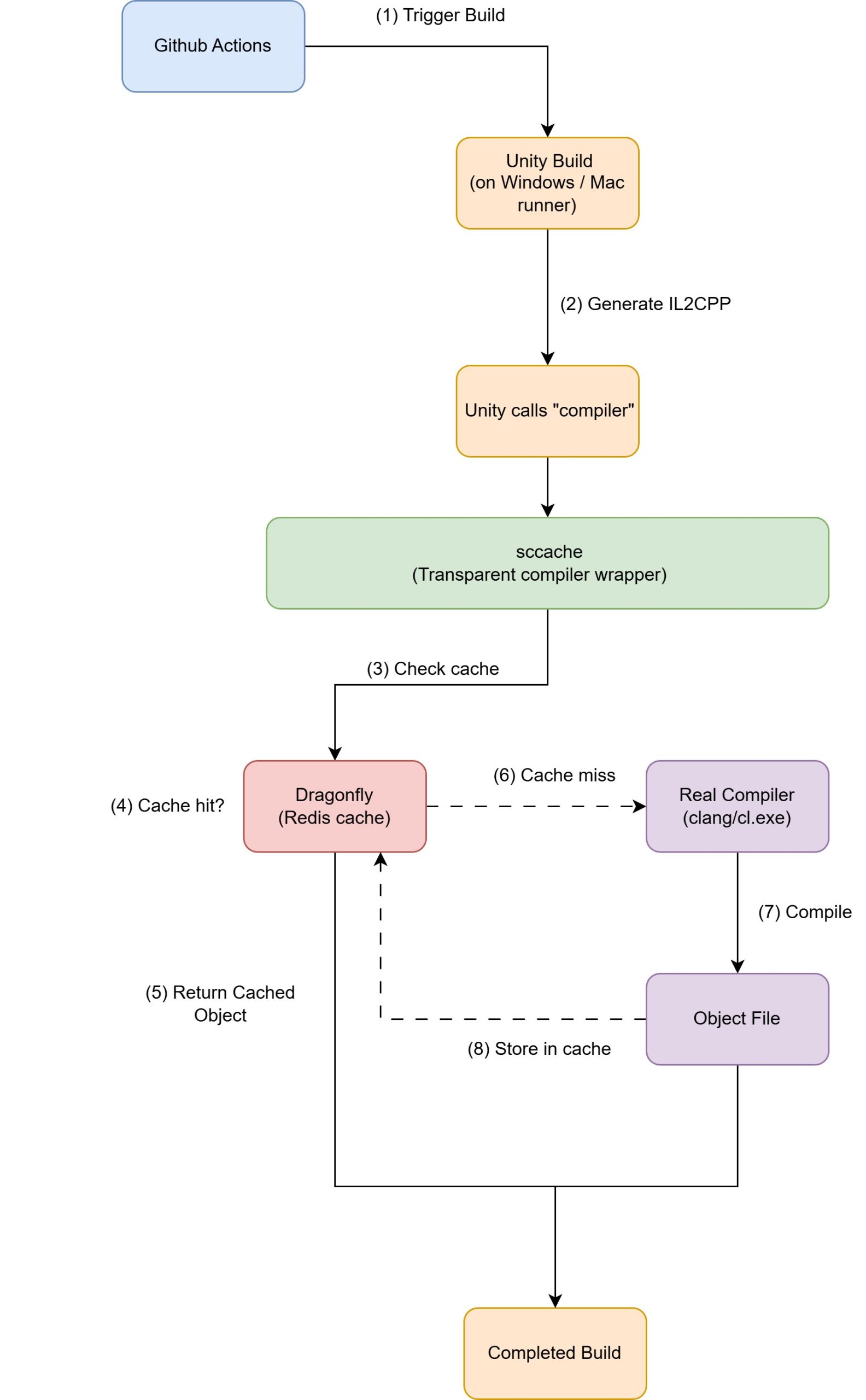 |
Here’s what happens during a build:
|
Why this works
IL2CPP-generated C++ is deterministic. The same C# code always generates the same C++ code. And the same C++ code, compiled with the same compiler flags and same compiler version, always produces the same object file. This determinism is what lets us safely share compilation results across machines.
Passive integration
The whole system is passive:
- Unity doesn’t know sccache exists
- Build scripts don’t change
- We just configure the environment before running Unity—set environment variables to point to sccache, make sure Dragonfly is reachable, and let it run
- If sccache or Dragonfly go down, builds still work—they just fall back to normal local compilation without caching
- No hard dependencies, no single points of failure in the critical path
Scalability
This architecture scales horizontally. More build agents means more cache hits. More cache hits means faster builds across the board. The only potential bottleneck is Dragonfly itself, but it’s barely breaking a sweat with our current workload. For dozens of build agents hitting it constantly, a single Dragonfly instance with decent specs handles everything without issue. If we ever needed more capacity, we could run multiple Dragonfly instances and split the cache across them, but we’re nowhere near that limit.
The Implementation
Getting sccache working with Unity’s IL2CPP builds required three pieces: a compiler wrapper that intercepts compilation calls, GitHub Actions configuration to set everything up, and careful handling of platform-specific compiler behavior. Here’s how each piece works.
The Compiler Wrapper
Unity’s IL2CPP process calls the clang compiler executable directly. We can’t tell Unity to use sccache instead, so we swap out the compiler binaries themselves.
The wrapper is a small executable that sits between Unity and the real compiler. We wrote ours in C++, but you could use any language that can create native executables—Rust, Go, even a compiled Python script with PyInstaller. The only requirement is that it can execute other processes and pass through their exit codes.
When Unity thinks it’s calling clang.exe, it’s actually calling our wrapper. The wrapper decides whether to route the call through sccache (for compilation) or directly to the original compiler (for linking), then passes control to whichever is appropriate.
Here’s the decision logic:
// Detect if this is a compilation or linking step
bool isCompilation = false;

for (int i = 1; i < argc; i++) {
    std::string arg = argv[i];
    if (arg == "-c" || arg == "/c") {
        isCompilation = true;
        break;
    }
}
The `-c` flag indicates compilation (as opposed to linking). If we see it, we route through sccache. If not, we call the compiler directly, bypassing the cache—linking can’t be cached the same way individual compilation steps can.
For compilation steps, the wrapper builds a command line like:
sccache.exe "C:/Path/To/clang++.exe.original" [original arguments]
For linking steps, it calls the original compiler directly. The `.original` suffix is how we keep track of the real compiler after we replace the original executable with our wrapper.
One subtle issue: clang needs to know its own executable path to find its resource directory (where it keeps headers and libraries). When calling the compiler directly, we execute the `.original` file but pass the wrapper’s path as argv[0]. When using sccache, we let sccache handle everything—it already knows how to deal with this.
const char* applicationName = useSccache ? NULL : originalCompilerFull.c_str();

BOOL success = CreateProcessA(
    applicationName,                        // NULL for sccache, .original for direct
    const_cast<char*>(cmdLine.c_str()),    // Command line with correct argv[0]
    // ... other parameters
);
Argument Passing Headaches
Getting arguments passed correctly through the wrapper turned out to be trickier than expected. Windows command-line parsing has quirks, especially around paths with spaces. The Android NDK installs to `C:\Program Files\…` by default, which means nearly every compiler path has spaces.
We had to handle quoting carefully. If you pass an already-quoted argument and quote it again, the compiler sees the quotes as part of the path and fails. But if you don’t quote paths with spaces, Windows splits them into multiple arguments. The solution was a `QuoteIfNeeded` function that checks whether an argument already has quotes or contains spaces, and only adds quotes when necessary:
std::string QuoteIfNeeded(const std::string& arg) {
    // Don't quote if already quoted
    if (!arg.empty() && arg[0] == '"') {
        return arg;
    }

    // Quote if contains spaces
    if (arg.find(' ') != std::string::npos) {
        return "\"" + arg + "\"";
    }

    return arg;
}
Early versions of the wrapper tried to be clever about parsing and rewriting arguments. That broke in weird ways—some compiler flags look like paths, some paths don’t need quotes, and there are edge cases everywhere. The final version just passes everything through as-is, only adding quotes when absolutely necessary. Simpler turned out to be more reliable.
Deploying the Wrapper
The GitHub Actions workflow deploys the wrapper at the start of each build. For Android:
# Find the NDK's clang directory
$clangPath = Get-ChildItem -Path $ndkRoot -Recurse -Filter "clang.exe" |
             Where-Object { $_.FullName -like "*toolchains\llvm\prebuilt*" } |
             Select-Object -First 1

$compilerDir = $clangPath.Directory.FullName

# Backup original compilers (only once)
if (-not (Test-Path "$compilerDir\clang.exe.original")) {
    Copy-Item "$compilerDir\clang.exe" "$compilerDir\clang.exe.original"
    Copy-Item "$compilerDir\clang++.exe" "$compilerDir\clang++.exe.original"
}

# Replace with wrapper
Copy-Item $wrapperExe "$compilerDir\clang.exe" -Force
Copy-Item $wrapperExe "$compilerDir\clang++.exe" -Force
The same pattern works for other platforms that use clang-based toolchains. At the end of the build (whether it succeeds or fails), we restore the originals to leave the build agents in a clean state.
Configuring sccache and Dragonfly
Before deploying the wrapper, the workflow configures sccache to use Dragonfly as its backend:
# Set Redis endpoint for sccache
[System.Environment]::SetEnvironmentVariable("SCCACHE_REDIS", "redis://dragonfly-server:6379", "Process")
$env:SCCACHE_REDIS = "redis://dragonfly-server:6379"
"SCCACHE_REDIS=redis://dragonfly-server:6379" >> $env:GITHUB_ENV

# Verify sccache is using Redis, not local disk
$stats = sccache --show-stats
if ($stats -match "Local disk") {
    Write-Host "❌ ERROR: sccache is still using local disk instead of Redis!"
    exit 1
}
The `SCCACHE_REDIS` environment variable tells sccache to use a Redis-compatible backend instead of local disk. We verify that sccache actually picked up the environment variable by checking its stats output. If it says “Local disk” instead of “Redis”, something went wrong and we fail the build early rather than continuing without caching.
The Build Flow
Once everything is configured, Unity runs and generates IL2CPP C++ code. Unity then starts calling what it thinks is clang.exe. The wrapper intercepts each call, checks if it’s a compilation step, and either:
- Routes it through sccache, which checks Dragonfly for a cached result
- Calls the original compiler directly (for linking steps)
The first time a specific compilation runs, sccache compiles it and stores the result in Dragonfly. Every subsequent build that needs the same object file—whether on the same machine or a different one—gets it from the cache instantly.
After the build completes, we check sccache’s statistics to see cache hit rates and time saved.
iOS: Why It Didn’t Work
Android builds with the NDK’s clang toolchain worked perfectly. We deployed the wrapper, configured sccache, and saw 50%+ reductions in compilation time. The approach should work for any platform using clang with standard command-line interfaces.
iOS was different. We tried two approaches, both failed.
Attempt 1: Response Files
We tried the same wrapper approach that worked for Android. It failed immediately. Xcode uses response files—instead of passing arguments on the command line, it writes them to a temporary file and passes @response.txt to the compiler.
sccache can’t handle this. It needs to hash the compiler invocation to generate a cache key. When it sees @response.txt, it tries to read that file to hash it. But Xcode deletes the file before sccache can read it. Every compilation gets a different hash, resulting in 0% cache hit rates.
Patching sccache to handle response files would require significant changes—detecting them, reading them before deletion, expanding them inline, handling nested response files. Not worth it for one platform.
Attempt 2: Custom Toolchains
Xcode supports custom toolchains—.xctoolchain bundles that wrap or replace compilers. We built one that integrated sccache directly.
We installed the toolchain. Xcode recognized it. It showed up in build settings. We could select it.
Then we ran a build. Xcode ignored it completely and used the default toolchain anyway.
We spent days debugging. Checked plist files, verified permissions, tried different bundle structures, looked for logs. Nothing worked. Xcode acknowledged the toolchain existed, let us select it, then proceeded as if we’d never touched anything.
Apple’s documentation on custom toolchains is sparse. The format is underdocumented. The selection logic is opaque. When it doesn’t work, Xcode doesn’t tell you why.
We gave up.
What we actually use
Xcode 26 has its own local compilation cache. It’s not distributed—each Mac caches its own compilations—but it works without any configuration. For iOS builds, we use that and accept the limitation.
Android builds benefit from shared cache across all agents. iOS builds don’t. But fighting Xcode isn’t worth it when there’s a native solution that’s “good enough.”
Performance & Results
The system works. Android builds went from 14 minutes 39 seconds to 6 minutes 4 seconds with a fully warmed cache on our fastest machine—a 59% reduction. The remaining 6 minutes is everything that can’t be cached: IL2CPP code generation, linking, and Unity’s overhead. The 8+ minutes we eliminated was pure C++ compilation.
In practice, cache hit rates depend on how much code changed. Here’s a typical build after a code update on a slower machine:
- 1424 compilation requests total
- 1114 cache hits (78%)
- 310 cache misses (files that needed actual compilation)
- Cache reads: 0.002s average
- Actual compilation: 3.515s average
With 78% hit rate, we compiled 310 files (~18 minutes) instead of all 1424 (~83 minutes). Cache reads are roughly 1750x faster than actual compilation. Cache writes also average 0.002s, so storing results in Dragonfly adds no penalty.
CI/CD pipeline impact
Before caching, every build agent recompiled everything independently. Now the first agent to build populates the cache, and subsequent agents pull from it. In practice, most builds hit 70-90% cache rates after the morning’s first builds warm things up.
This matters most for pipelines running many builds in quick succession—feature branches, PR validation, nightly builds. The first build after code changes still takes full time, but follow-up builds across different agents benefit immediately.
Infrastructure costs
We already had Proxmox VE hosting Unity Accelerator. Adding Dragonfly cost one more VM allocation—no new hardware, no cloud spending. We sized the VM with enough RAM to hold the working set in memory.
The real cost comparison is developer time. Cutting builds from 15 minutes to 6 minutes keeps developers in flow. Over weeks and months, that compounds into significantly faster iteration cycles.
Dragonfly handles dozens of build agents without stress. Peak usage shows minimal CPU and memory pressure even when multiple builds hit it simultaneously. The multi-threaded C++ architecture handles concurrent requests efficiently—significantly better than Redis would for this workload.
Wrapping up
Distributed compilation caching won’t solve every build performance problem, but for IL2CPP-heavy projects, it eliminates the biggest bottleneck. The passive integration approach means low risk—if the cache goes down, builds still work. And the infrastructure cost is minimal if you’re already running your own build agents.